Oneiro Management Group LLC
Text Message Program
Effective October 12, 2026
Oneiro Management Group LLC runs the Oneiro ordering portal at order.oneiropharmacy.org, which hospitals and clinics use to order prescribed therapies from our pharmacy. Portal users can choose to receive short text messages about their own orders and sign-ins. This page explains who receives texts, how they opt in, and what we send.
We never send marketing or promotional text messages. This program covers transactional messages only: order and account notifications, and one-time sign-in security codes.
Our texts contain no clinical or health information. They tell you an update is waiting, and you sign in to the portal to read it.
Who receives our texts
Only staff at the hospitals, clinics, and facilities we serve who have a named account on the portal. We do not text patients through this program, and we do not buy, rent, or import phone lists.
How you opt in
Text messages are off for every account until the account holder turns them on themselves:
- The user signs in to the portal and opens Settings → Notifications.
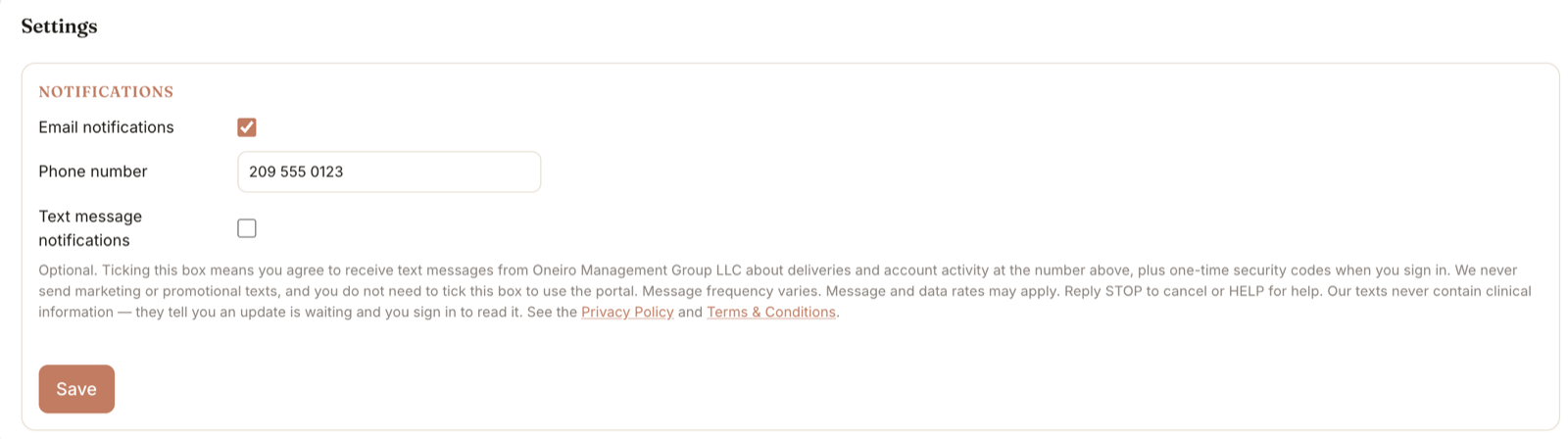
- They type their own mobile number, then tick the Text message notifications box. The box is unticked by default.
- The disclosure shown below appears directly under the box, so the user reads it at the moment they opt in.
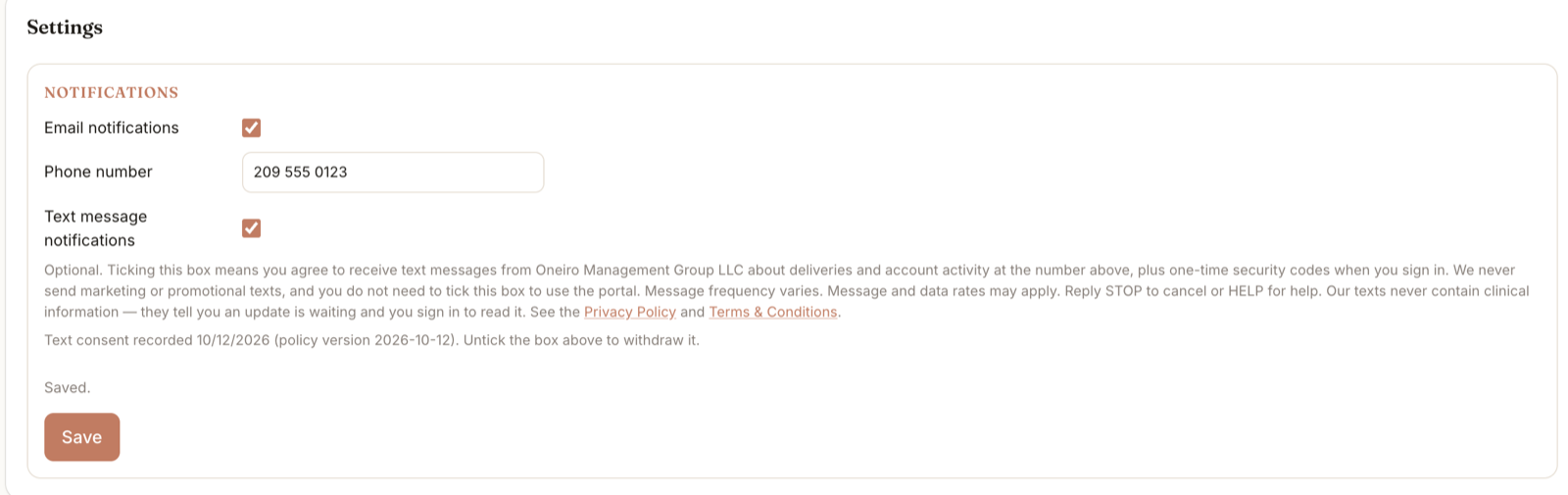
- We record the date and the version of the wording they agreed to. Administrators cannot opt anyone in, and creating an account does not opt anyone in.
Opting in to texts is a separate, optional choice. It is not combined with any other consent: it is not part of creating an account, accepting our Terms & Conditions, or receiving pharmacy services, and none of those require it.
Notifications
Optional. Ticking this box means you agree to receive text messages from Oneiro Management Group LLC about deliveries and account activity at the number above, plus one-time security codes when you sign in. We never send marketing or promotional texts, and you do not need to tick this box to use the portal. Message frequency varies. Message and data rates may apply. Reply STOP to cancel or HELP for help. Our texts never contain clinical information — they tell you an update is waiting and you sign in to read it. See the Privacy Policy and Terms & Conditions.
How the opt-in appears in portal Settings, with the box unticked as every user first sees it. The disclosure text is reproduced exactly.
Screenshots from the live portal
What we send
Depending on your role and activity, you may receive:
Texts never name a patient, a medication or therapy, or an order number.
Frequency, cost, and help
- Message frequency varies with your account activity.
- Message and data rates may apply.
- Reply STOP at any time to opt out. You will receive one confirmation and no further texts. You can also untick the box in Settings.
- Reply HELP for help, or email info@oneiromanagementgroup.com.
- Carriers are not liable for delayed or undelivered messages.
Privacy
We do not sell or share your mobile number or SMS opt-in data with third parties or affiliates for marketing purposes. Your number is shared only with our messaging provider, to deliver these texts. See our Privacy Policy and Terms & Conditions.